
Find Every Gap Before Your Auditor Does
Multi-cloud compliance scanning with specific remediation for every finding. CLI scanner for engineers. Desktop dashboard for teams. Evidence packages your auditor expects.
14-day free trial • $297/month after trial • Cancel anytime
The Scanner Is Free. The Audit Is the Hard Part.
Community Edition scans all ten frameworks across AWS, Azure and GCP, and it stays free. AuditKit is for everything that happens after the scan finds something.
The deliverable
A findings list is not an evidence package. AuditKit emits one folder per control holding the finding, a remediation script, a direct console link and a screenshot guide naming the exact screen to capture. That is the artifact an assessor asks for.
Your whole estate
Auditors scope the organization, not one account. AuditKit scans AWS Organizations, Azure Management Groups and GCP Folders in a single pass and reports one consolidated posture.
The other 51 weeks
Posture drifts the moment somebody opens a security group. Scheduled scans, drift detection and alerts to Slack, Teams, email or webhook catch it when it happens, not the week before your audit.
Same ten frameworks either way. Compare the editions →
Stop Paying Consultants to Run Scans
What AuditKit Replaces
AuditKit replaces expensive consultants, not your auditors. You still need your auditor for official certification (CPA for SOC2, QSA for PCI-DSS, C3PAO for CMMC), but you arrive at that assessment already knowing:
- Exactly which controls you're failing
- Specific AWS/Azure/GCP configurations to fix
- What evidence your auditor will ask for
- That you'll pass before paying the assessment fee
Pay consultants $50K to tell you what's wrong, then pay auditors to verify you fixed it.
Pay $297/month to know what's wrong, fix it yourself, then pay your auditor knowing you'll pass.
That's $46,000+ back in your budget.
One Platform, Two Interfaces
A CLI scanner for engineers who automate everything, and a desktop dashboard for teams who need visibility. Both included with AuditKit Pro.
CLI Scanner
Terminal-based scanning for engineers. Run compliance checks from your command line, integrate with CI/CD pipelines, automate with cron. Works in air-gapped environments with zero external dependencies.
- 675 controls across 10 frameworks
- AWS, Azure, GCP (Microsoft 365 via ScubaGear import)
- Vulnerability evidence from Inspector, Defender for Cloud and VM Manager; Nessus, Trivy and Grype import
- PDF, HTML, JSON, CSV output
- Fix scripts for every finding
Desktop GUI
A local web dashboard covering scanning, findings, evidence packages, drift and scheduled scans. Runs in your browser, no cloud dependencies. Custom control definitions and cached-scan replay (--offline) are CLI-only.
- Compliance scores and trends per framework
- Findings filtered by severity, framework, provider or status
- Scan history with drift comparison between any two scans
- Evidence packages, generated and downloaded in the browser
- Multi-account scanning across an AWS Organization or OU
- ScubaGear import for Microsoft 365; Prowler import for AWS, Azure and GCP
Desktop GUI
Web-based dashboard that runs locally. No cloud dependencies. Air-gap compatible.
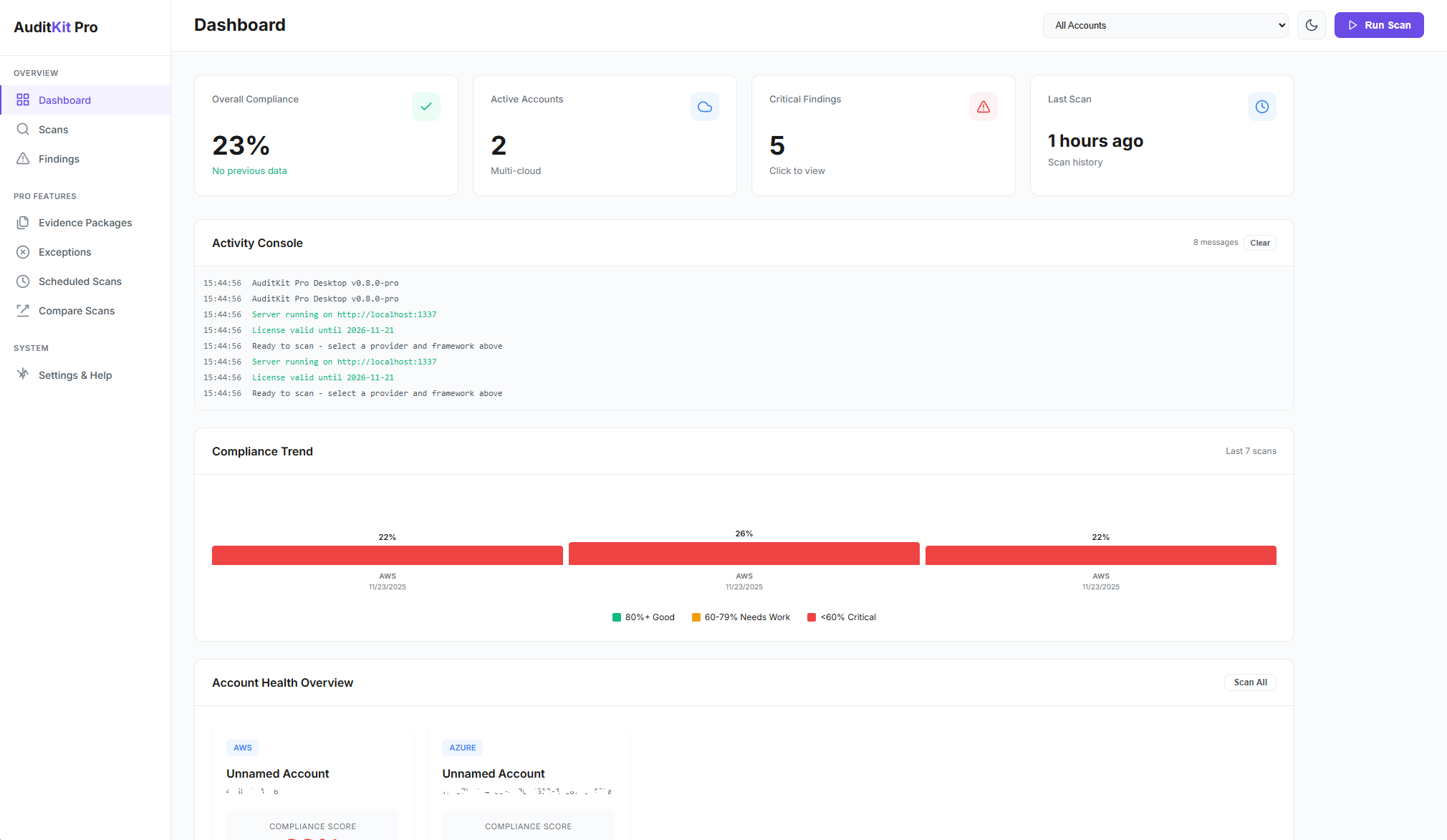
Real-time compliance scores & trends
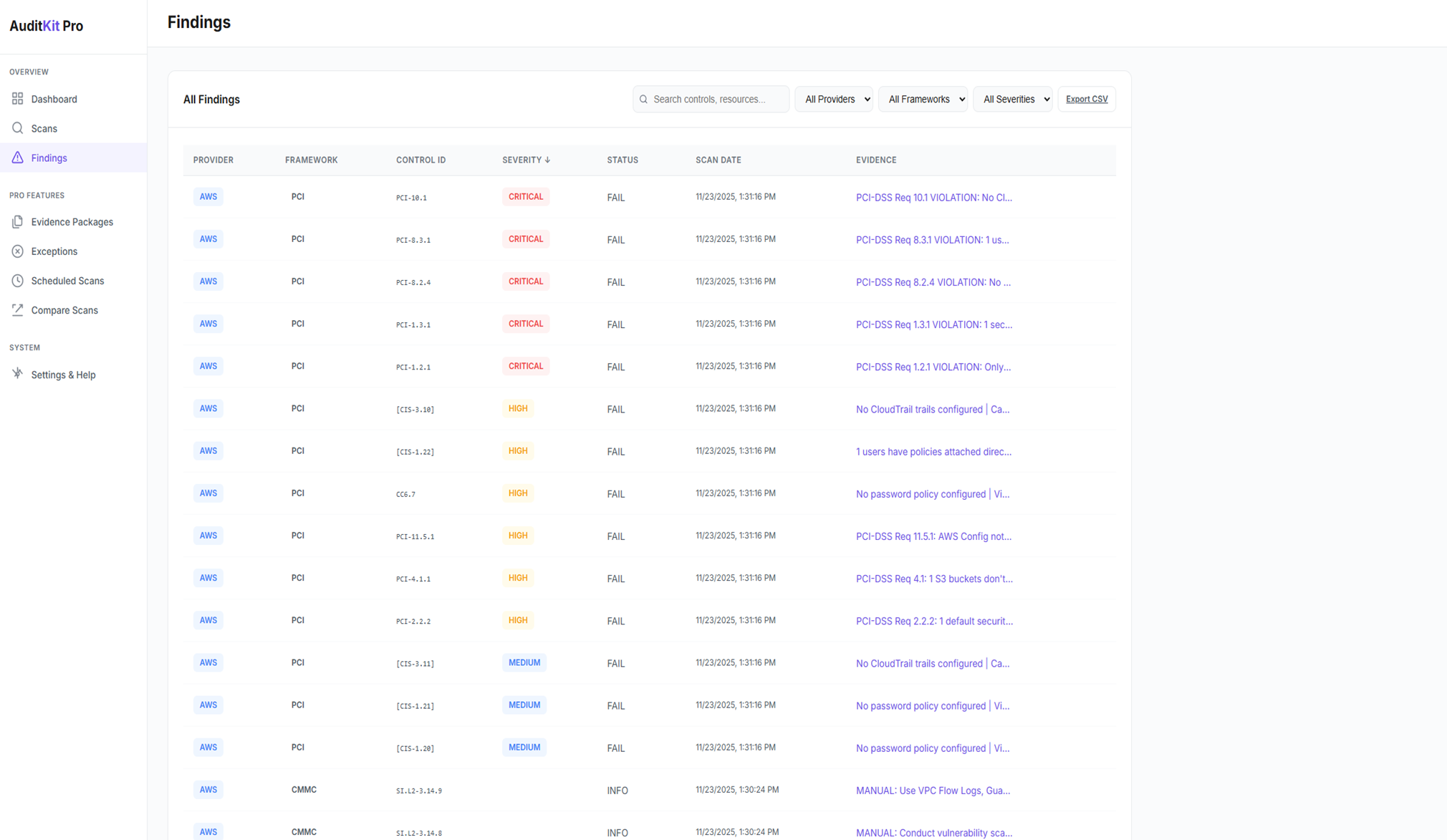
Filter by severity, with control, framework and evidence in view
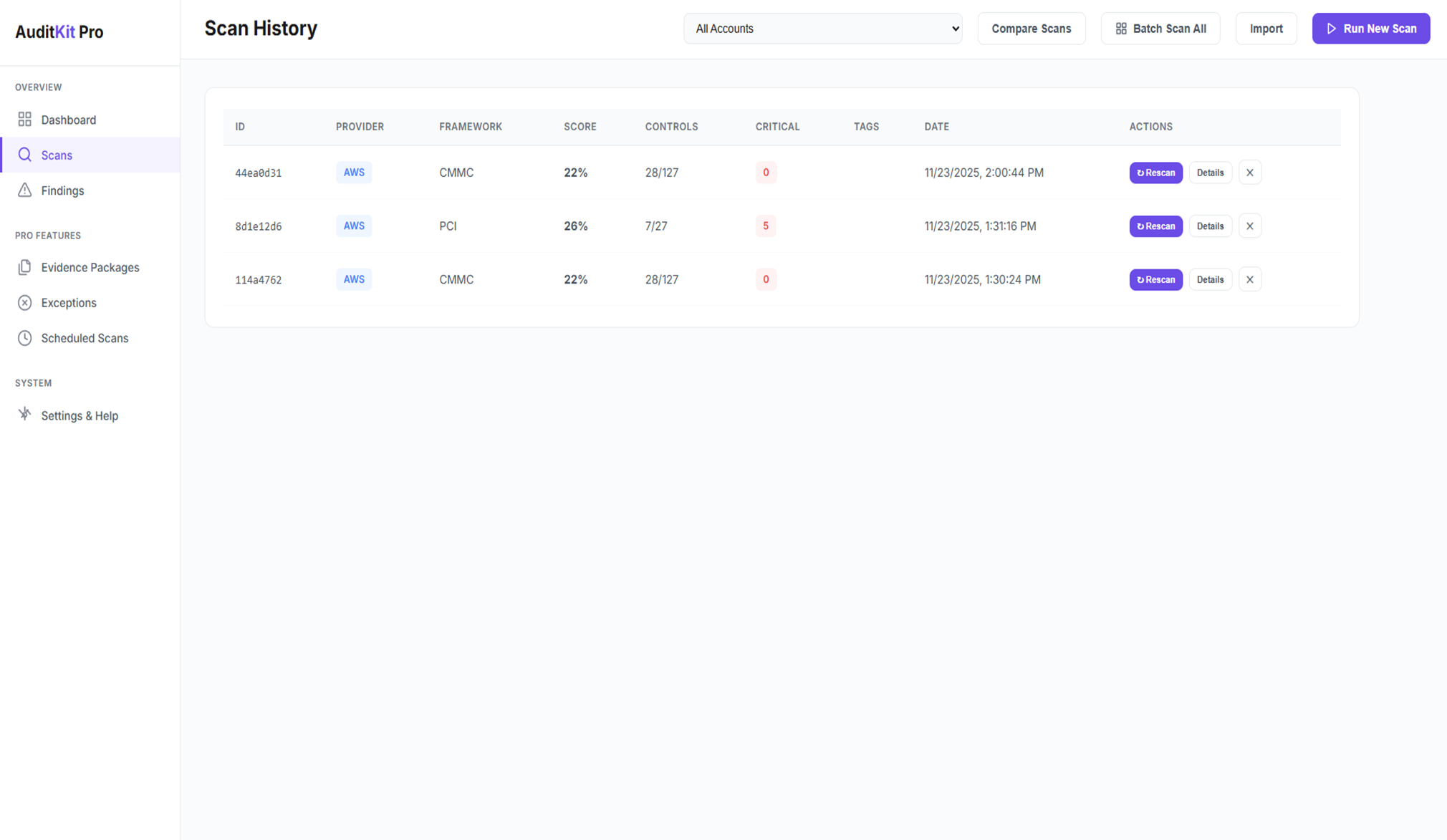
Browse all past scans
Visual Dashboard
Real-time compliance scores, trends, and critical findings at a glance. Track progress across all your cloud accounts and frameworks.
Scan History & Findings
Browse every past scan. Filter findings by severity, framework, provider or status. Export to PDF, HTML or CSV.
Everything in One Place
Evidence packages, exception management, drift detection, and scheduled scans, all accessible from your browser. No cloud account required.
How It Works
Built for CMMC Level 2 Self-Assessment
Every one of the 110 CMMC Level 2 practices assessed: automated checks where your cloud configuration can prove it, and structured evidence guidance where an assessor needs a document or a screenshot. Documented, so you can show your work.
Defense Contractors
Phase 1 is in force: DoW contracts require self-assessment against the Level 2 practices. Phase 2 C3PAO assessment is suspended pending review, so the live obligation today is documenting your own posture. AuditKit assesses all 110 Level 2 practices across your AWS, Azure and GCP environments, and folds in Microsoft 365 findings imported from ScubaGear: automated checks where your cloud configuration can prove it, the vulnerability practices answered from what Inspector, Defender for Cloud or VM Manager actually reaches and how quickly findings are closed, and structured evidence guidance where an assessor needs a document. It generates evidence packages and remediation commands for every automated finding.
The Community Edition reports all 110 practices for free, each gap with its fix and the console screen to photograph. AuditKit turns those findings into the artifact your assessor asks for: evidence packages, deeper automated coverage, multi-account scanning, and continuous monitoring.
Pro Features
Available with an AuditKit Pro subscription.
Multi-Account Scanning
Scan entire AWS Organizations, Azure Management Groups, and GCP Folders with one command. Unified compliance reports across all accounts. Perfect for separate dev/staging/prod environments.
Evidence Packages
Generates auditor-ready ZIP files with configuration dumps, logs and documentation in the format auditors expect, with a folder per control holding the finding, a console link and a step-by-step evidence guide, plus a vulnerability-management appendix listing which assets your scanner reaches and which findings are past their remediation window.
Custom Controls NEW
Define your own security checks in YAML. Create organization-specific controls, tag requirements, naming conventions, and resource count validations. Execute custom checks alongside built-in frameworks.
Continuous Monitoring
Scheduled scans that alert you when a control that was passing starts failing, when your compliance score drops, or when a scan cannot run. Sends to Slack, Microsoft Teams, email, webhook, syslog or a file. Air-gapped friendly.
Drift Detection
Compare dev/staging/prod environments to identify configuration drift. Ensures consistent security posture across all environments before your audit.
Exceptions & Waivers
Record an approved exception against a control with a reason, an approver and an expiry date, so accepted risks stop appearing as open findings and the waiver register is ready for your assessor.
Auditor-Ready Evidence Packages
The evidence-package command generates an organized folder of evidence for every control, or a ZIP archive when the output path ends in .zip.
What AuditKit Finds
Representative scenarios from real compliance scans.
CMMC Level 2 Scan
Defense contractor • AWS, Azure, GCP
15 Level 2 practice gaps surfaced in seconds from a single AWS account, concentrated in identification and authentication, audit logging and protecting CUI. The same 110 practices are assessed on Azure and GCP. Every gap ships with the evidence that triggered it, a direct console link, and a remediation step. Evidence package generated with per-practice folders for C3PAO review.
SOC2 Audit Prep
SaaS company • AWS, Azure, GCP
Evidence package turned a scattered screenshot hunt into a checklist: every control gets its own folder with the finding, a direct console link, and a step-by-step evidence guide. PDF report, JSON export and an organised evidence ZIP, in one command.
PCI-DSS Assessment
E-commerce • AWS, Azure, GCP
Flagged SSH ports open to 0.0.0.0/0, console access without MFA and missing CloudTrail audit logging on AWS, with equivalent PCI requirements assessed on Azure and GCP. The kind of findings a QSA fails an assessment over.
Frequently Asked Questions
What compliance frameworks does AuditKit support?
AuditKit supports SOC2, PCI-DSS v4.0.1, CMMC (Level 1 + Level 2), HIPAA, NIST 800-53, NIST CSF 2.0, CIS Benchmarks (AWS, Azure, GCP), ISO 27001, FedRAMP, and GDPR. Cross-framework mappings mean a single scan maps findings across all applicable frameworks simultaneously.
Do I still need an auditor?
Yes. AuditKit replaces consultants, not auditors. You still need your CPA for SOC2, QSA for PCI-DSS, or C3PAO for CMMC. AuditKit ensures you arrive at that assessment already knowing every gap is fixed and your evidence is organized, so you pass on the first attempt instead of paying for a failed audit.
How is this different from hiring consultants?
Consultants charge $15-30K just to run scans and tell you what's wrong, then another $20-40K for remediation guidance. AuditKit runs the same scans for $297/month and gives you specific fix-it commands for every finding. You may still want consultants for complex architecture decisions, but you won't pay them $50K+ to run automated scans.
What's the difference between the CLI and Desktop GUI?
Both are included in your subscription. The CLI scanner is a terminal-based tool for engineers, good for automation, CI/CD integration, and scripting. The Desktop GUI is a local web dashboard with visual compliance scores, a findings explorer, scan history and evidence management. Custom control definitions and cached-scan replay (--offline) are CLI-only. Use whichever fits your workflow, or both.
Does this work for CMMC Level 2?
Yes. AuditKit assesses all 110 CMMC Level 2 practices across AWS, Azure and GCP, folding in Microsoft 365 findings imported from ScubaGear - checked automatically against your cloud configuration where that is possible, and reported with evidence-collection guidance where an assessor needs a document or a screenshot. It generates C3PAO-ready evidence packages and remediation commands for every automated finding. The Community Edition reports all 110 practices for free, each failing check with its fix and the screen to photograph.
Can I re-scan after fixing issues?
Yes, unlimited re-scanning is included. Fix issues, re-scan immediately, and track compliance progress over time. No per-scan fees, no usage limits. Most customers scan daily during their prep period.
How does the 14-day trial work?
Click "Start 14-Day Free Trial" to begin. You'll get an email with your licence file (license.lic) attached - save it to ~/.auditkit-pro/license.lic - and reply with your GitHub username to be added to the private release repository, usually within 4 hours. Full access to all features including the Desktop GUI. Cancel anytime during trial, no questions asked.
Do all features work in air-gapped environments?
Nothing in AuditKit talks to AuditKit. Licence files are verified locally against a key compiled into the binary, there is no SaaS dashboard, no account to create and no telemetry. The Desktop GUI, daemon, evidence packages, reports and drift detection all run on your machine.
Scanning itself still reaches your cloud provider's API, so a host with no route to AWS, Azure or GCP cannot scan them. Run the scan where the credentials reach, then use --offline to work from the cached results, or import ScubaGear and Prowler output.
What if I'm already working with consultants?
Use AuditKit to validate their work. Run scans after they make changes to verify gaps are actually fixed. Many customers use this to reduce consultant hours by 50%+ since you're not paying them to manually check configurations.
Know Exactly Where You Stand in 30 Minutes
675 controls. 10 compliance frameworks. Specific remediation for every finding. Evidence packages your auditor expects. CLI + Desktop GUI included.
Start 14-Day Free Trial14-day free trial • $297/month after trial • Cancel anytime • No setup fees